

As an Amazon Associate I earn from qualifying purchases.
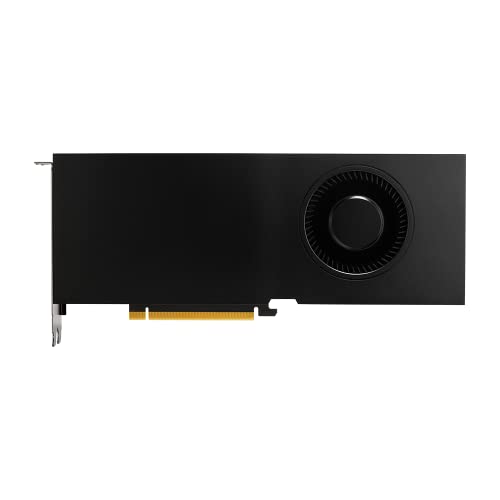
- 8192 optimized CUDA Cores, 27.8 TFLOPS
- 256 third generation Tensor Cores, 222.2 TFLOPS
- 64 second generation RT Cores, 54.2 TFLOPS
- Dual-slot width, full length form factor
- NVLink for GPU memory pooling and performance scaling
PNY NVIDIA RTX A5000
The PNY NVIDIA RTX A5000 is a high-performance graphics card designed for professional applications. With its advanced features and powerful performance, it is an ideal choice for users who require top-notch graphics capabilities. In this review article, we will explore the various applications of the PNY NVIDIA RTX A5000 and discuss its advantages and disadvantages.
Architecture and Features
The PNY NVIDIA RTX A5000 is built on the Ampere architecture and comes equipped with 8192 optimized CUDA Cores. This allows for exceptional parallel processing capabilities, making it suitable for demanding tasks such as 3D rendering, video editing, and scientific simulations. Additionally, it boasts 256 third-generation Tensor Cores, providing accelerated AI and deep learning performance with 222.2 TFLOPS of compute power. Furthermore, the card is equipped with 64 second-generation RT Cores, enabling real-time ray tracing for stunning visual effects and realistic lighting.
Advantages
- Exceptional Performance: With its high CUDA Core count and powerful Tensor Cores, the PNY NVIDIA RTX A5000 delivers exceptional performance for a wide range of professional applications.
- Real-Time Ray Tracing: The inclusion of second-generation RT Cores enables real-time ray tracing, allowing for realistic lighting and reflections in supported applications.
- NVLink: The PNY NVIDIA RTX A5000 supports NVLink, which allows for GPU memory pooling and performance scaling, making it ideal for multi-GPU setups.
Disadvantages
- Price: The PNY NVIDIA RTX A5000 is a high-end graphics card, and its advanced features come at a premium price, making it less accessible for budget-conscious users.
- Power Consumption: Due to its powerful performance, the RTX A5000 has a relatively high power consumption, which may require a robust power supply unit.
Applications
1. 3D Rendering
The PNY NVIDIA RTX A5000 is well-suited for 3D rendering tasks. Its high CUDA Core count and powerful Tensor Cores enable fast and efficient rendering of complex scenes. Whether you are working on architectural visualization, product design, or animation, the RTX A5000 can handle the most demanding rendering workflows with ease.
Advantages:
- Fast and efficient rendering
- Real-time ray tracing for realistic lighting
- Accelerated AI denoising for improved image quality
2. Video Editing
Video editing requires a graphics card that can handle high-resolution footage and complex effects. The PNY NVIDIA RTX A5000 excels in this field with its powerful CUDA Cores and Tensor Cores. It allows for smooth scrubbing through the timeline, real-time color grading, and accelerated video encoding, significantly improving the editing workflow.
Advantages:
- Smooth video playback and editing
- Real-time color grading
- Accelerated video encoding for faster exports
3. Scientific Simulations
Scientific simulations often involve complex calculations and simulations that require significant computational power. The PNY NVIDIA RTX A5000, with its high CUDA Core count and Tensor Cores, is well-suited for these tasks. It can accelerate simulations in fields such as physics, chemistry, and engineering, allowing researchers and scientists to obtain results faster.
Advantages:
- Accelerated scientific simulations
- Improved accuracy with AI-assisted simulations
- Support for libraries and frameworks like CUDA and TensorFlow
Summary
The PNY NVIDIA RTX A5000 is a powerful graphics card that excels in various professional applications. With its advanced architecture, including optimized CUDA Cores, Tensor Cores, and RT Cores, it delivers exceptional performance for tasks such as 3D rendering, video editing, and scientific simulations. While it comes at a premium price and requires a robust power supply, its advantages outweigh the disadvantages for professionals who demand top-notch graphics capabilities. Whether you are a content creator, designer, or scientist, the PNY NVIDIA RTX A5000 is a reliable choice for your graphics-intensive workflows.
Product Pros and Cons
- Pros:
- Exceptional performance for demanding tasks
- Real-time ray tracing for realistic lighting
- NVLink support for GPU memory pooling and performance scaling
- Cons:
- High price
- Relatively high power consumption
Question and Answer Section
Q: Can the PNY NVIDIA RTX A5000 run the latest AAA games?
A: While the PNY NVIDIA RTX A5000 is primarily designed for professional applications, it is also capable of running the latest AAA games. Its powerful CUDA Cores and RT Cores provide excellent gaming performance, allowing for high frame rates and realistic graphics.
Q: Is the PNY NVIDIA RTX A5000 compatible with macOS?
A: Yes, the PNY NVIDIA RTX A5000 is compatible with macOS. However, please note that NVIDIA drivers for macOS are provided by Apple, and their availability may vary depending on the macOS version.
Q: Can I use multiple PNY NVIDIA RTX A5000 cards in SLI for increased performance?
A: No, the PNY NVIDIA RTX A5000 does not support SLI (Scalable Link Interface) for multi-GPU configurations. However, it does support NVLink, which allows for GPU memory pooling and performance scaling, making it suitable for certain multi-GPU setups.
Q: Does the PNY NVIDIA RTX A5000 come with any bundled software?
A: The PNY NVIDIA RTX A5000 does not come with any bundled software. However, it is compatible with various professional software applications, including 3D modeling and rendering software, video editing programs, and scientific simulation tools.
If you want to find this product on Amazon’s website, search with this exact ASIN number: B09G1Y6ZGT, or you can click the link below:
- 8192 optimized CUDA Cores, 27.8 TFLOPS
- 256 third generation Tensor Cores, 222.2 TFLOPS
- 64 second generation RT Cores, 54.2 TFLOPS
- Dual-slot width, full length form factor
- NVLink for GPU memory pooling and performance scaling
Here are top selling related products:

- Step Up to Next-Level Performance - Redefine your laptop experience with the Acer Aspire 16 AI. Powered by the Snapdragon X X1-26-100, a premium integrated GPU with up to 1.7 TFLOPs and NPU with 45 TOPs for optimized processing across CPU, GPU, and NPU workloads and delivering best-in-class performance and power efficiency.
- New AI Superpowers - Discover the power of Recall (preview), improved Windows search, and Click to Do (preview) on Copilot+ PCs. Effortlessly locate past content, perform natural searches, and interact with text and images – all while ensuring your data remains private and you stay productive*.
- Built on Brilliant AI Foundations - The Acer Aspire 16 AI harnesses the industry-leading Qualcomm AI Engine with an integrated Qualcomm Hexagon NPU, delivering transformative experiences for creativity, video conferencing, security, and productivity assistants. The Qualcomm AI Engine supports Windows Studio Effects and many other AI-accelerated applications and experiences, to make possibilities endless.
- Screens that Speak to Your Senses - Immerse yourself in a world of vibrant visuals. Enjoy stunning clarity, rich 100% sRGB colors, and sharp detail on the 16" 120Hz WUXGA ultra-high-resolution touchscreen display – acting as a panoramic playground for entertainment, artistic expression, and engaging AI experiences that dazzle the eye.
- Streamline Your Settings with AcerSense - Intelligent Acer AI solutions are at your fingertips. Effortlessly get answers, streamline settings, optimize your video presence, and elevate communication. Experience intuitive AI that’s easy to use and seamlessly enhances your productivity.

- Step Up to Next-Level Performance - Redefine your laptop experience with the Acer Aspire 16 AI. Powered by the Snapdragon X X1-26-100, a premium integrated GPU with up to 1.7 TFLOPs and NPU with 45 TOPs for optimized processing across CPU, GPU, and NPU workloads and delivering best-in-class performance and power efficiency.
- New AI Superpowers - Discover the power of Recall (preview), improved Windows search, and Click to Do (preview) on Copilot+ PCs. Effortlessly locate past content, perform natural searches, and interact with text and images – all while ensuring your data remains private and you stay productive*.
- Built on Brilliant AI Foundations - The Acer Aspire 16 AI harnesses the industry-leading Qualcomm AI Engine with an integrated Qualcomm Hexagon NPU, delivering transformative experiences for creativity, video conferencing, security, and productivity assistants. The Qualcomm AI Engine supports Windows Studio Effects and many other AI-accelerated applications and experiences, to make possibilities endless.
- Screens that Speak to Your Senses - Immerse yourself in a world of vibrant visuals. Enjoy stunning clarity, rich 100% sRGB colors, and sharp detail on the 16" 120Hz WUXGA ultra-high-resolution display – acting as a panoramic playground for entertainment, artistic expression, and engaging AI experiences that dazzle the eye.
- Streamline Your Settings with AcerSense - Intelligent Acer AI solutions are at your fingertips. Effortlessly get answers, streamline settings, optimize your video presence, and elevate communication. Experience intuitive AI that’s easy to use and seamlessly enhances your productivity.